Wednesday, May 29, 2024

Breakup recordings individually automatically in Audacity

Scenario:

A recorded list of names, with some silence between each one.  Need them individually saved into their own file name.  Audacity can do this automatically.  Tested in version 3.4.2

1:

Load your recording file with all the names into audacity.

Here is my list of names, 26 of them


There is about 1-2 seconds of blank space between each name:


2:

Now Select the entire recording


3: 

Select "Analyze" then "Label Sounds"


4:
Now you can alter the parameters to decide when the audio is split up.  I pretty much left it at default for my case.  Click on "APPLY"
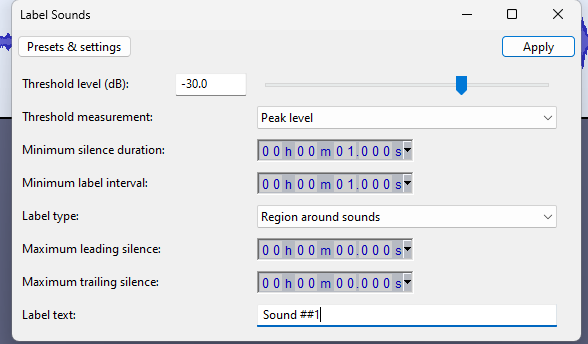


Audacity will now Label each audio section.  This is a good way to see if your parameters are enough to get you the divisions you need.


5:
Select FILE-> Export Audio
Select the folder you want to put them in
Select "Multiple Fles"
Select "EXPORT"


6:
Open the folder you put them in 


If this posting has been of any help to you, I'd love to know! 
If you have suggestions of how to improve it, let me know in the comments!  Thanks!


Thursday, May 23, 2024

Retrieve password from mRemoteNG


  1. Open mRemoteNG and go to the menu Tools -> External Tools

  2. Then select New to create a new external tool.

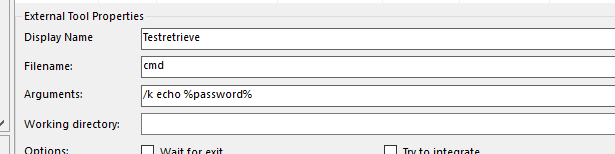
  3. In the External Tools Properties at the bottom of the screen, fill in the following:

    Display Name =Any name that you want

    Filename =  CMD
    Arguments = /k echo %password%

    Should look like this:


Next go to the connection where you would like to retrieve the password from and right-click on it and choose “External tools” -> The tool you just defined.


Will get an output like this:


If this posting has been of any help to you, I'd love to know! 
If you have suggestions of how to improve it, let me know in the comments!  Thanks!

Monday, April 15, 2024

Factory Reset Sony SRG X120 X400 Camera

 Get a paper clip

Stick it in the hole for at least FIVE seconds where #11 indicates.


The camera will do a quick reset and you can logon with

admin / Admin_1234

The default IP is usually 192.168.0.100

The dip switch in the back, #3 will need to be set to #1 on to access the HTTP 

I hope this post was of help to you! If you have suggestions of how to improve it, let me know in the comments!  Thanks!


Thursday, April 4, 2024

Some autohotkey commands

 Some commands that I fought with but finally was able to make work.

Send key "F2" to a window that might not be active without stealing focus from the active window


In this example, i wanted to first get the actual windows title associated to the executable.

processName := "vMix64.exe"

if (WinExist("ahk_exe " . processName)){

WinGetTitle, title, ahk_exe %processName%

} 

ControlSend,, {F2},%title%


Sunday, March 3, 2024

Sony SRG Visca Control via OBS

 Here's a quick and dirty how to make Visca over IP work on a Sony XRG series camera.

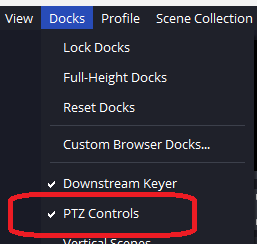
The plugin i'm using to test with OBS is PTZ Controls v0.15.4

Install that for your OBS

Then launch it.


Click on the GEAR icon in the lower left corner


Click on the + icon in the lower left corner and select "VISCA (UDP)"

In the IP address enter in the IP of your camera and then enter 52381 (default Sony port) as the port.  Click APPLY

Go back to the PTZ control and you should now be able to use the arrows to move your camera.


I hope this post was of help to you! If you have suggestions of how to improve it, let me know in the comments!  Thanks!

Tuesday, February 6, 2024

Grandstream GXW4216 GXW42XX on Asterisk (FreePBX)

In FreePBX create an SIP extension (I'm using SIP, not PJSIP)


Create an extension, give it the display and CID values you want.  The rest can remain as default.
Save / apply your changes.


(Screen shot of the advanced page, its default settings)


Go into your Grandstream GXW42XX 

Go to FXS PORTS -> Port Settings -> FXS X-X


Put in your Extension (s) information

(password will paste, but will show empty after you press Save and Apply

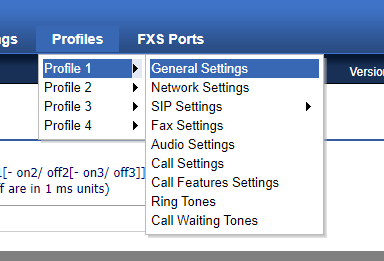
Now go to "PROFILES" (i'm using "Profiles 1" -> General Settings


I'm using a generic Asterisk FreePBX box, using SIP (not PJSIP)

Set the Profile Active to "YES"
SIP server is the IP/FQDN of your asterisk box with the :5061 at the end


Save and Apply the changes.

That really should be it.  I didn't change anything else for it to register and work.


I hope this post was of help to you! If you have suggestions of how to improve it, let me know in the comments!  Thanks!


Wednesday, January 31, 2024

Iscsi on Linux Mint (ubuntu)


root@node01:~# 
apt -y install open-iscsi
root@node01:~# 
vi /etc/iscsi/initiatorname.iscsi
# change to the same IQN you set on the iSCSI target server

InitiatorName=
iqn.2020-05.world.srv:node01.initiator01
root@node01:~# 
vi /etc/iscsi/iscsid.conf
# line 57: uncomment

node.session.auth.authmethod = CHAP
# line 61,62: uncomment and specify the username and password you set on the iSCSI target server

node.session.auth.username = 
username

node.session.auth.password = 
password
root@node01:~# 
systemctl restart iscsid open-iscsi
# discover target

root@node01:~# 
iscsiadm -m discovery -t sendtargets -p 10.0.0.30

10.0.0.30:3260,1 iqn.2020-05.world.srv:dlp.target01
# confirm status after discovery

root@node01:~# 
iscsiadm -m node -o show

# BEGIN RECORD 2.0-874
node.name = iqn.2020-05.world.srv:dlp.target01
node.tpgt = 1
node.startup = manual
node.leading_login = No
.....
.....
node.conn[0].iscsi.IFMarker = No
node.conn[0].iscsi.OFMarker = No
# END RECORD

# login to the target

root@node01:~# 
iscsiadm -m node --login

Logging in to [iface: default, target: iqn.2020-05.world.srv:dlp.target01, portal: 10.0.0.30,3260] (multiple)
Login to [iface: default, target: iqn.2020-05.world.srv:dlp.target01, portal: 10.0.0.30,3260] successful.

# confirm the established session

root@node01:~# 
iscsiadm -m session -o show

tcp: [1] 10.0.0.30:3260,1 iqn.2020-05.world.srv:dlp.target01 (non-flash)
# confirm the partitions

root@node01:~# 
cat /proc/partitions

major minor  #blocks  name

   7        0      56264 loop0
   7        1      56268 loop1
   7        2      70624 loop2
   7        3      70764 loop3
   7        4      27740 loop4
 252        0   31457280 sda
 252        1       1024 sda1
 252        2    1048576 sda2
 252        3   30405632 sda3
 253        0   26214400 dm-0
  11        0    1048575 sr0
   8        0   10485760 sdb
# added new device provided from the target server as [sdb]
[2]After setting iSCSI device, configure on Initiator to use it like follows.
# create label

root@node01:~# 
parted --script /dev/sdb "mklabel gpt"

# create partiton

root@node01:~# 
parted --script /dev/sdb "mkpart primary 0% 100%"

# format with ext4

root@node01:~# 
mkfs.ext4 /dev/sdb1

mke2fs 1.45.5 (07-Jan-2020)
Creating filesystem with 2617344 4k blocks and 655360 inodes
Filesystem UUID: f4255883-6b01-4ec1-b17c-358f86df1eba
Superblock backups stored on blocks:
        32768, 98304, 163840, 229376, 294912, 819200, 884736, 1605632

Allocating group tables: done
Writing inode tables: done
Creating journal (16384 blocks): done
Writing superblocks and filesystem accounting information: done

root@node01:~# 
mount /dev/sdb1 /mnt

root@node01:~# 
df -hT

Filesystem                        Type      Size  Used Avail Use% Mounted on
udev                              devtmpfs  1.9G     0  1.9G   0% /dev
tmpfs                             tmpfs     394M  1.1M  393M   1% /run
/dev/mapper/ubuntu--vg-ubuntu--lv ext4       25G  2.2G   22G  10% /
tmpfs                             tmpfs     2.0G     0  2.0G   0% /dev/shm
tmpfs                             tmpfs     5.0M     0  5.0M   0% /run/lock
tmpfs                             tmpfs     2.0G     0  2.0G   0% /sys/fs/cgroup
/dev/vda2                         ext4      976M  103M  806M  12% /boot
/dev/loop0                        squashfs   55M   55M     0 100% /snap/core18/1705
/dev/loop1                        squashfs   55M   55M     0 100% /snap/core18/1754
/dev/loop2                        squashfs   69M   69M     0 100% /snap/lxd/14804
/dev/loop3                        squashfs   70M   70M     0 100% /snap/lxd/14890
/dev/loop4                        squashfs   28M   28M     0 100% /snap/snapd/7264
/dev/sda1                         ext4      9.8G   37M  9.3G   1% /mnt
tmpfs                             tmpfs     394M     0  394M   0% /run/user/0