This is a collection of information gathered together running these systems.
"Wiegand 26 Bit TCP IP Door Controller"
HSY-02B HSY-04B HSY-01B
https://www.alibaba.com/product-detail/HSY-Manufacturer-TCP-IP-Door-Access_763217699.html
Similar controllers are the 02b and 01b

There is also either a big brother or maybe a cousin to these boards made by Wiengand called the 2004.net
http://www.wiegand.com.cn/english/support.htm
It seems too be a a similar unit, upgraded/different design perhaps? I'm not sure but specs and board layout pins seem to be similar. The import reason for mentioning it is that this site has some additional software that you can try with these apps.


HOOKING IT UP
There are variations of the same system above that can control more or less doors, this one pictured below has 4 door input/output controls, but the input/output configuration is the same among the various models

Ive been using these types of power supplies
UHPPOTE AC100-240V to 12V/5A Power Supply Support Backup Battery

Connection Layout Diagram Example

WARNING: You need to have some electrical concepts in place to prevent sending power to a system not expecting it. Implementations are very situation dependent, this example is only a possible solution in a certain set of circumstances.


Electric door strikes and magnetic locks can consume a lot of power and should be sourced separately from a different supply than the one powering the board, since its requirements are very. You don't want to burn out the power supply.

In some cases, the handle itself on the door isn't enough to override the system when exiting, In the case of a magnetically locked door, you may require to press a button to release the magnetic lock. Some, as you approach, sense your approach and will automatically release the door.
so you need to have some sort of mechanism that detects you are trying to exist and will allow you to do so without a card. The request to exit button contact, when activated, will trigger the system to release that door for a time period.

Forced Open/ Open Detection
These boards require an additional module to do some additional input output.
Forced/Unauthorized opening or the leaving of a door open can be detected using a door open sensor
First you'll need this board which connects to the expansion port of the door controller
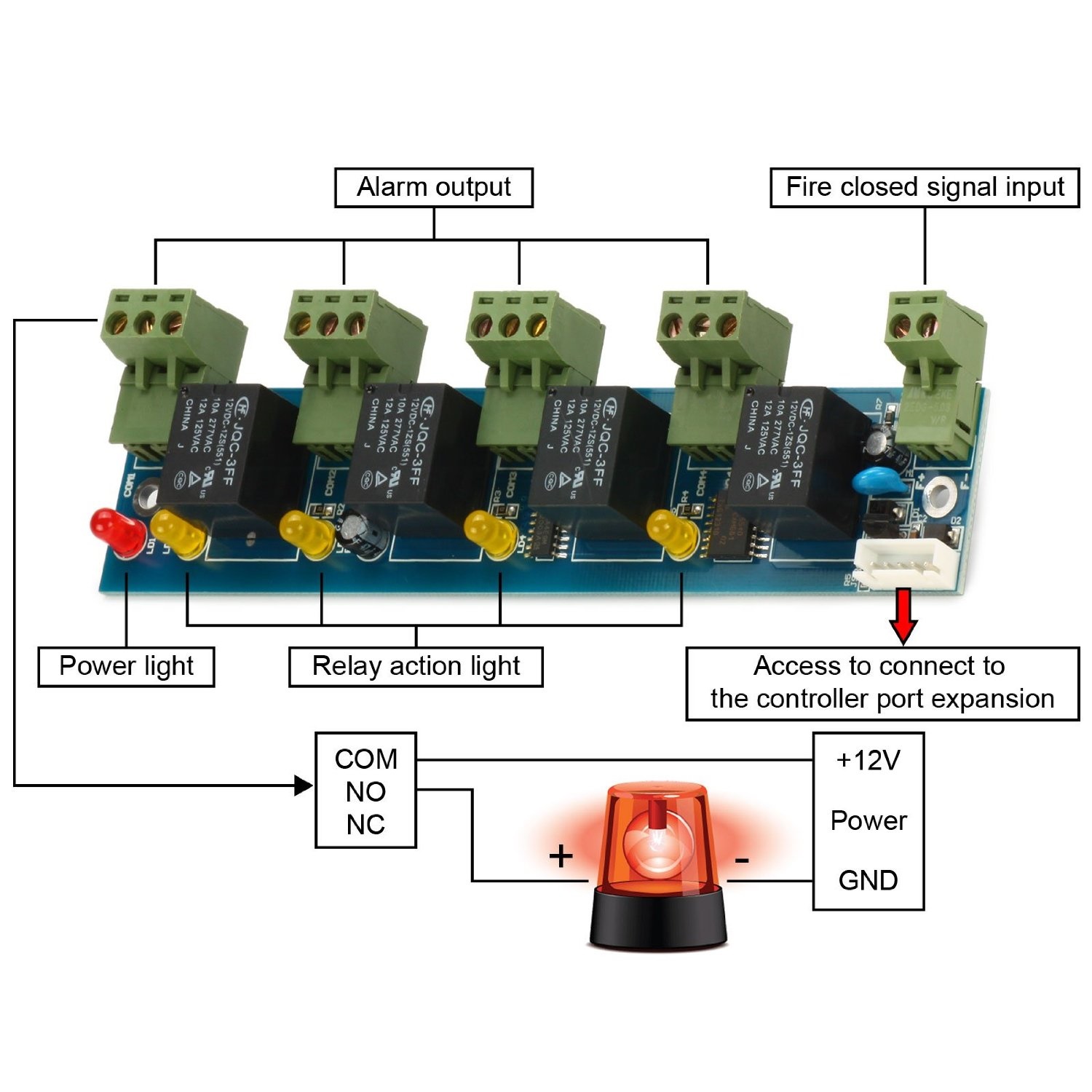
This board can also be connected to a fire alarm panel, allowing the system to unlock all doors upon the activation of a compatible fire alarm system.
In the diagram this shows the "ALARM OUTPUT" connections, however these can serve as inputs alternatively.
So, for example, you connect this module to your alarm panel, then wire a door open sensor to it.

Administration Software to the controller(s)
This is actually pretty easy. These controllers can be standalone, meaning you can buy an RFID controller, and just use the simple GUI on it to control cards and who can get in or out. If you have 1 controller and maybe less than 25 people, this isn't so bad, since you may only have 4 doors to worry about. But lets say you have hundreds of people and 8-16-100 doors? Well you'll want to use the management application that interfaces to these doors. (its outlined below). The management application gives far greater control of the doors and the features. It allows you to manage large number of users access, remote activate/deactivate doors with some mouse clicks, and a large number of other security features that aren't necessarily available.
The software 'talks' to the RFID boards and uploads/downloads the data. The management software is not needed to run the doors, its only need to do add/moves/changes to the system. ALL the doors run 'autonomously', independent from the controller. So if you shut off the computer running the administration software, the doors don't care, they just keep on doing what they're told to do. When you make the changes you need to user access, you 'upload' this data with a click of a button to all the controllers, and that data is then sent to the memory of the RFID boards. Also you can download the data from these boards to the controller computer, merging all the different doors into a single utility to run reports. Very convenient and easy. The best part is that the RFID boards are connected to the management software via Ethernet. Beneficial in larger deployments where you might have a corporate office with doors spread far apart within a building or in different cities. If there is an established network to those offices, and the management computer can talk to the other networks, you are able to manage those systems.
YES you technically control these boards across the internet, I would highly discourage that practice as the security access to the board itself maybe easily compromised by hackers, we do not know.
WGACCESS Software (WINDOWS ONLY) That latest version is 8.97 at time of running.
. I'm running 7.95 on Windows 10 and 2012R2. 7.75 seems to work on windows 10 and 11 too.
Here is an alternate link to the 7.95 version of software
http://www.wiegand.com.cn/soft/soft_all_32/MJ_all_en.rar
http://www.wiegand.com.cn/english/support.htm
Default user and password
User: abc
Extended Function password: 5678
Registration code is 2004
There is a OPENSOURCE intuitive with these controllers, I haven't done much with it yet, but here is a link to it https://github.com/carbonsphere/UHPPOTE
ACCESSING THE DEVICE


FAQ
QUESTION:
Where can I download the controller software?
WGACCESS Software downloaded at http://www.wiegand.com.cn/english/support.htm
QUESTION:
Do I need the door administration software on my computer running all the time for the system work?
No. The software is for administration purposes only. You assign cards and permissions in the software, the you upload the data to the controllers. Once that data is uploaded, the controllers run autonomously.
QUESTION:
Does the software gather logs automatically?
No. You must click on the controller and do a download to gather the exit/entry log history
3> QUESTION:
I've hooked up ethernet to the door controller board, how do I connect?
The board DEFAULTS to DHCP.
- If you have access to the router that hands out DHCP, you can look in the routers DHCP table to see the IP assigned to it.
- If you know the IP, and the controller is on a different, but local/route able LAN segment, you can manually enter the IP address in.

You can also use the administration software to look for the controller board, however the computer running that software has to be on the same network.

What is NO and NC?
This refers to the type of electric circuit that controls the door and should not be mistaken to be a reference to the type of lock you are using with it. NO and NC are used to describe the connections (switch or on this RFID controller, relays) and manual switches like emergency stop buttons.
NO stands for "normally open" (connections are normally open and close when a switch is used). Normally Open (NO) stops the flow of electricity until its commanded to 'close ' and start the electricity passing through the circuit
NC stands for "normally closed" (connections are normally closed and open when a switch is used). Normally Closed (NC) is a circuit which allows the flow of electricity until its commanded to 'open' and stop the electricity from passing.
Normally Lock and Normally Unlock
There are various types of lock mechanisms, and they generally come in two types of default behaviors when there is no power, or its normal mode, either locked or unlocked. There are various reasons why you would want this, but its normally decided on the state of the door in its majority of use and/or the state of the door when there is a complete power fail of the system.
The lock type, in conjunction with their connection to the board dictate their behavior when a card is presented for entry. And this would be how you want the door to be controlled
A lock, whose natural un-powered state is locked, would usually be connected to a "normally open" circuit on the board. When the door is to be unlocked, the controller changes the circuit to "closed" sending power to unlock it the door.
How many doors can the software control
100 doors using 25 controllers (4 doors / controller)
What type of readers are compatible
The RFID receiver needs to output a 26 bit Wiengand signal.
Can I use motion sensors to unlock the door?
Yes
Is it possible to open 4 doors with just one keypad but 4 different pin-codes?
Yes. However you can't do it through software. You would need to wire up the door latches to a relay(s), which would trigger the unlock of the doors. You would want to be careful of power consumption that the relays use, and the power that is delivered.
Factory Reset / Password Reset of controller board's GUI
The controller board has a GUI on it, and you can use this to add/remove cards if you want. The default password can be changed for security purposes, but if you forget it, here's how you clear the password.
This will reset the IP and Password of the controller. It will NOT factory reset the unit remaining memory in my experience. This means that it will maintain card history and configuration within the unit. Meaning door function should continue to work while you perform this procedure.
If you have lost the configuration password to this board. Here is what you will need to do.


With the power running, I connected the SDA and GND pins. I had a ping going to the controller in question, and the ping stopped when the controller reset.

Click on the Controller SN that you want to configure, then click "TRY WEB"


You can now reconfigure this box's ip using the ADVANCED OPTIONS button in the thick client, or through the GUI itself.


| The name of the access control software | Brands and names apply | Download | |||||
| WGACCESS Professional Access Management Software V8.9821 | WGACCESS brand, WG2000 series 32-bit brand controller | APP Instructions | |||||
| ADCT high-end professional access management software V8.9821 | ADCT brand, ADCT3000 series 32-bit high-end brand access controller | ||||||
| Neutral Interface OEM ODM Product Access Management Software V8.9821 | Neutral, OEM ODM series controller | ||||||
| Micro-tillage video access control setup instruction manual | WGACCESS、Adroitor、ADCT | ||||||
| Access Controller, WEB Function, PC Setup Tool, Widget (Green Instant Installation) V2.7 | Universal for 32-bit access controllers | ||||||
| WeTilly Cloud Mini Program Server Setup Tool Widget (Green Instant Installation) V3.21 | WGACCESS, Adroitor, ADCT brand 32-bit access controller | ||||||
220V AC power cord
Use a three-core power cord with a cross-sectional area of more than 1.0 square millimeters and require a power source Be sure to be groundedto avoid power interference
Electrically lock the wire to the controller
Use a two-core power cord with a cross-sectional area of more than 1.0 square millimeters.
If it exceeds 50 meters, consider using thicker wires, or connecting multiple strands in parallel, with a maximum length of no more than 100 meters.
For the line from the door magnet to the controller, it is recommended to choose a two-core wire with a wire diameter of 0.22Above square millimeters,
If there is no need to know the opening and closing status of the door online, or there is no need to have the door not closed for a long time, alarm and illegal intrusion alarm interlock, the door magnetic wire can be disconnected.
The line from the card reader to the controller
The cross-sectional area of the card reader wiring ≥ 0.22 square millimeters, and both Category 5 and Category 5 network cables are acceptable.
If you don't need a card reader to distinguish between legal and illegal cards through sound and light feedback, you can not connect BEEPER (blue) and LED (brown), and it is better to twist the data cable Data1Data0 into each other.
The distance from the reader to the controller should not exceed 100 meters, it is recommended to be within 80 meters, if the distance from the reader to the controller is exceeded50 meters, it is recommended to thicken or multi-strand in one strand to power the card reader, which will help improve the performance of the card reader
button to the controller's wire
It is recommended to use two-core wire, with a wire diameter of more than 0.22 square millimeters
Connection:


Function description:
1. Four-way alarm output, which can be freely defined for a certain door and several door functions of the controller;
2. It can be connected to the output of anti-theft alarm, smoke gas temperature alarm, emergency call and rescue alarm signal, and the output status of each alarm signal can be freely defined through the software, that is, it is set to normally open or normally closed;
3. It can be connected to the fire closure signal output, and automatically open all the doors of the controller after receiving the fire signal, and generate a fire alarm record for later query;
4. It can control forced break-in alarm, door not closed for a long time, forced entry alarm, door opening linkage output, invalid card alarm, fire alarm linkage, etc.
5. The delay holding time of each output can be set, 0-600 seconds.
Extended Function Secret Sub Menu
When in Extended Functions "OTHER" press CTRL+SHIFT+Q to activate


